
Free uninstaller software for Windows
Revo Uninstaller is a utility that removes files from Microsoft Windows devices. Apart from uninstalling programs, it deletes files that operating system tools left behind in the Registry. This program cleans out temporary folder files, entries from the startup folder, browser history, and cache, and recently opened file list. A portable version of the program is also available. Revo Uninstaller can now be used on Windows 11 too.
Top Recommended Alternative

Third-party software for full uninstallation
Most Windows users uninstall programs using their Control Panels. However, there are reasons why third-party applications are handy to have as an addition.
On Windows, installers create directories in your Program Files and scatter shortcuts across the system. They may also make extra changes and add files elsewhere, which makes it challenging for the system to get rid of everything on default mode.
Therefore, while not necessary, Revo Uninstaller is beneficial, especially if you tend to store a lot on your PC.
The UI
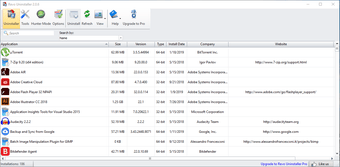
Revo Group designed this program with ease of use in mind. Once you launch it, the main interface will show you all the installed programs. The options and information about any are a right-click away.
To remove a program, all you need to do is select one. Revo Uninstaller will then launch its thorough removal process and create a backup point in case of a mistake.
During its removal in your Registry, it uses a wizard approach. The software prompts you to select the files you wish to be removed at each step.
Program removal
There are two ways of removing files using Revo Uninstaller - Drag and Drop, as explained above, and Hunter mode.
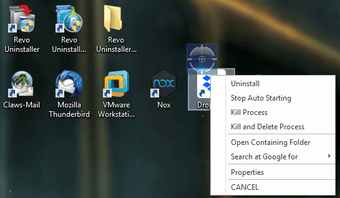
The Hunter mode is ideal for getting rid of those silent, unknown programs that you wouldn't normally be able to find. You get a target icon that you place over a file or folder you want to be removed.
Functionalities
Revo Uninstaller is packed with handy features and functionalities. Primarily, it removes software and programs from your PC, but it can also uninstall built-in Windows apps.
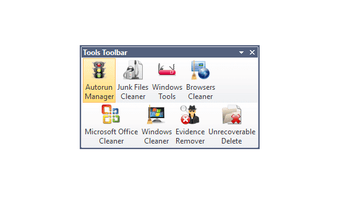
You'll find eight extra cleaning tools, each with its handy usage. The Autorun Manager controls what you see on startup, and the Windows Tools bar shows you all the tools in one place.
As regards cleaners, there are those for junk, unnecessary files, browser history, Microsoft Office history, and confidential data.
Finally, you can choose to perform an unrecoverable deletion, which permanently erases the files and folders.
Performance
This program shows excellent, smooth, and quick performance. All it lacks is a bundleware remover and a software updater to take all the work away from your hands.
Note also that Revo Uninstaller is only for Windows devices. If you want an excellent alternative for Mac, try AppZapper.
Portable version
The main differences between the installable and portable versions of Revo Uninstaller are the license and portability.
With portable, only the user gets the license. Otherwise, it's designed to work from an external USB device. That way, you can run it on any computer, leaving no traces on the Registry or hard drive.
Safety and security
When it comes to using this program to get rid of files from your PC, it's safe. It performs well and deletes clutter. The only software that is not the best is security, as uninstalling it requires specific tools.
As regards security, Revo Uninstaller doesn't gather any sensitive data, nor does it sell any personal data it receives to third parties.
Free vs. Paid
Revo Uninstaller comes in three versions. You can use it free of charge while still receiving most of its benefits. Alternatively, you can opt for the Pro version with a free trial, and the Portable Pro.
The extras you receive once you go pro are the removal of browser extensions, extended scanning, quick and multiple removals, the force uninstall feature, and real-time monitoring of your system.
If you're looking for a 100% free application, Bulk Crap Uninstaller is open-source and quick, offering more than the free version of Revo.
App Cleaner is another free alternative you could go for if you don't need a plethora of features. Finally, Wise Program Uninstaller is quite safe, free, and able to repair programs.Other important alternatives to Revo Uninstaller are IObit Uninstaller, CCleaner, and Ashampoo Uninstaller.
Replacement and supplement
Revo Uninstaller is a highly functional third-party app for removing anything you no longer want on your Windows device and one of the best such tools on the market. It acts as an assistant to your built-in system uninstaller, scanning for the leftovers, and getting rid of everything in the process. Be sure to purchase the full version if you want to experience the entirety of what this program can do, though.

















.png)